Keywords

 5'25", 30Mb
 2'28", 30Mb
 2'25", 34Mb
 3'09", 20Mb
  7'19", 28Mb


 4'02", 12Mb
An important aspect of making the Web accessible to blind users is ensuring that all important web page elements such as links, clickable buttons, and form fields have explicitly assigned labels. Properly labeled content is then correctly read out by screen readers, a dominant assistive technology used by blind users. In particular, improperly labeled form fields can critically impede online transactions such as shopping, paying bills, etc. with screen readers. Very often labels are not associated with form fields or are missing altogether, making form filling a challenge for blind users. Algorithms for associating a form element with one of several candidate labels in its vicinity must cope with the variability of the element's features including label's location relative to the element, distance to the element, etc. Probabilistic models provide a natural machinery to reason with such uncertainties. In this paper we present a Finite Mixture Model (FMM) formulation of the label association problem. The variability of feature values are captured in the FMM by a mixture of random variables that are drawn from parameterized distributions. Then, the most likely label to be paired with a form element is computed by maximizing the log-likelihood of the feature data using the Expectation-Maximization algorithm. We also adapt the FMM approach for two related problems: assigning labels (from an external Knowledge Base) to form elements that have no candidate labels in their vicinity and for quickly identifying clickable elements such as add-to-cart, checkout, etc., used in online transactions even when these elements do not have textual captions (e.g., image buttons w/o alternative text). We provide a quantitative evaluation of our techniques, as well as a user study with two blind subjects who used an aural web browser implementing our approach.

The lack of access to visual information like text labels, icons, and colors can cause frustration and decrease independence for blind people. Current access technology uses automatic approaches to address some problems in this space, but the technology is error-prone, limited in scope, and quite expensive. In this paper, we introduce VizWiz, a talking application for mobile phones that offers a new alternative to answering visual questions in nearly real-time - asking multiple people on the web. To support answering questions quickly, we introduce a general approach for intelligently recruiting human workers in advance called quikTurkit so that workers are available when new questions arrive. A field deployment with 11 blind participants illustrates that blind people can effectively use VizWiz to cheaply answer questions in their everyday lives, highlighting issues that automatic approaches will need to address to be useful. Finally, we illustrate the potential of using VizWiz as part of the participatory design of advanced tools by using it to build and evaluate VizWiz::LocateIt, an interactive mobile tool that helps blind people solve general visual search problems.
 2'12", 15Mb
 We describe a unique form of hands-free interaction that can be implemented on most commodity computing platforms. Our approach supports blowing at a laptop or computer screen to directly control certain interactive applications. Localization estimates are produced in real-time to determine where on the screen the person is blowing. Our approach relies solely on a single microphone, such as those already embedded in a standard laptop or one placed near a computer monitor, which makes our approach very cost-effective and easy-to-deploy. We show example interaction techniques that leverage this approach.

 4'44", 9Mb
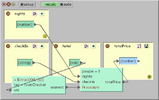
 Dido is an application (and application development environment) in a web page. It is a single web page containing rich structured data, an AJAXy interactive visualizer/editor for that data, and a "metaeditor" for WYSIWYG editing of the visualizer/editor. Historically, users have been limited to the data schemas, visualizations, and interactions offered by a small number of heavyweight applications. In contrast, Dido encourages and enables the end user to edit (not code) in his or her web browser a distinct ephemeral interaction "wrapper" for each data collection that is specifically suited to its intended use. Dido's active document metaphor has been explored before but we show how, given today's web infrastructure, it can be deployed in a small self-contained HTML document without touching a web client or server.
 5'29", 66Mb
 When the Macintosh first made graphical user interfaces popular the notion of each person having their own computer was novel. Today's technology landscape is characterized by multiple computers per person many with far more capacity than that original Mac. The world of input devices, display devices and interactive techniques is far richer than those Macintosh days. Despite all of this diversity in possible interactions very few of these integrate well with each other. The monolithic isolated user interface architecture that characterized the Macintosh still dominates a great deal of today's personal computing. This talk will explore how possible ways to change that architecture so that information, interaction and communication flows more smoothly among our devices and those of our associates.


 4'22", 55Mb
  3'55", 47Mb
 1'24", 12Mb
  25", 2Mb
  2'31", 17Mb
 4'19", 21Mb
  5'00", 32Mb
  3'01", 9Mb
 4'45", 44Mb

 5'57", 21Mb
 SketchWizard allows designers to create Wizard of Oz prototypes of pen-based user interfaces in the early stages of design. In the past, designers have been inhibited from participating in the design of pen-based interfaces because of the inadequacy of paper prototypes and the difficulty of developing functional prototypes. In SketchWizard, designers and end users share a drawing canvas between two computers, allowing the designer to simulate the behavior of recognition or other technologies. Special editing features are provided to help designers respond quickly to end-user input. This paper describes the SketchWizard system and presents two evaluations of our approach. The first is an early feasibility study in which Wizard of Oz was used to prototype a pen-based user interface. The second is a laboratory study in which designers used SketchWizard to simulate existing pen-based interfaces. Both showed that end users gave valuable feedback in spite of delays between end-user actions and wizard updates.

 3'55", 47Mb

Users increasingly interact with a heterogeneous collection of computing devices. The applications that users employ on those devices, however, still largely provide user experiences that assume the use of a single computer. This failure is due in part to the difficulty of creating user experiences that span multiple devices, particularly the need to manage identifying, connecting to, and communicating with other devices. In this paper we present an infrastructure based on instant messaging that simplifies adding that additional functionality to applications. Our infrastructure elevates device ownership to a first class property, allowing developers to provide functionality that spans personal devices without writing code to manage users' devices or establish connections among them. It also provides simple mechanisms for applications to send information, events, or commands between a user's devices. We demonstrate the effectiveness of our infrastructure by presenting a set of sample applications built with it and a user study demonstrating that developers new to the infrastructure can implement all of the cross-device functionality for three applications in, on average, less than two and a half hours.


 3'21", 15Mb
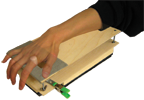
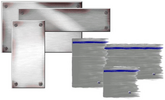
 This paper presents Foldable User Interfaces (FUI), a combination of a 3D GUI with windows imbued with the physics of paper, and Foldable Input Devices (FIDs). FIDs are sheets of paper that allow realistic transformations of graphical sheets in the FUI. Foldable input devices are made out of construction paper augmented with IR reflectors, and tracked by computer vision. Window sheets can be picked up and flexed with simple movements and deformations of the FID. FIDs allow a diverse lexicon of one-handed and two-handed interaction techniques, including folding, bending, flipping and stacking. We show how these can be used to ease the creation of simple 3D models, but also for tasks such as page navigation.
 1'24", 12Mb
  1'41", 8Mb
  6'34", 22Mb 5'57", 21Mb
 SketchWizard allows designers to create Wizard of Oz prototypes of pen-based user interfaces in the early stages of design. In the past, designers have been inhibited from participating in the design of pen-based interfaces because of the inadequacy of paper prototypes and the difficulty of developing functional prototypes. In SketchWizard, designers and end users share a drawing canvas between two computers, allowing the designer to simulate the behavior of recognition or other technologies. Special editing features are provided to help designers respond quickly to end-user input. This paper describes the SketchWizard system and presents two evaluations of our approach. The first is an early feasibility study in which Wizard of Oz was used to prototype a pen-based user interface. The second is a laboratory study in which designers used SketchWizard to simulate existing pen-based interfaces. Both showed that end users gave valuable feedback in spite of delays between end-user actions and wizard updates.


 2'53", 21Mb
 4'12", 51Mb 4'19", 21Mb
  2'54", 21Mb

 2'33", 48Mb
  3'41", 27Mb
  5'00", 40Mb
 We present a system for the actuation of tangible magnetic widgets (Madgets) on interactive tabletops. Our system combines electromagnetic actuation with fiber optic tracking to move and operate physical controls. The presented mechanism supports actuating complex tangibles that consist of multiple parts. A grid of optical fibers transmits marker positions past our actuation hardware to cameras below the table. We introduce a visual tracking algorithm that is able to detect objects and touches from the strongly sub-sampled video input of that grid. Six sample Madgets illustrate the capabilities of our approach, ranging from tangential movement and height actuation to inductive power transfer. Madgets combine the benefits of passive, untethered, and translucent tangibles with the ability to actuate them with multiple degrees of freedom.
 6'39", 39Mb
 4'31", 23Mb
TapSongs are presented, which enable user authentication on a single "binary" sensor (e.g., button) by matching the rhythm of tap down/up events to a jingle timing model created by the user. We describe our matching algorithm, which employs absolute match criteria and learns from successful logins. We also present a study of 10 subjects showing that after they created their own TapSong models from 12 examples (< 2 minutes), their subsequent login attempts were 83.2% successful. Furthermore, aural and visual eavesdropping of the experimenter's logins resulted in only 10.7% successful imposter logins by subjects. Even when subjects heard the target jingles played by a synthesized piano, they were only 19.4% successful logging in as imposters. These results are attributable to subtle but reliable individual differences in people's tapping, which are supported by prior findings in music psychology.


 3'08", 53Mb


 5'12", 81Mb
 7'52", 59Mb
  4'27", 58Mb
 57", 2Mb
  2'54", 13Mb
 Temporal events, while often discrete, also have interesting relationships within and across times: larger events are often collections of smaller more discrete events (battles within wars; artists' works within a form); events at one point also have correlations with events at other points (a play written in one period is related to its performance over a period of time). Most temporal visualisations, however, only represent discrete data points or single data types along a single timeline: this event started here and ended there; this work was published at this time; this tag was popular for this period. In order to represent richer, faceted attributes of temporal events, we present Continuum. Continuum enables hierarchical relationships in temporal data to be represented and explored; it enables relationships between events across periods to be expressed, and in particular it enables user-determined control over the level of detail of any facet of interest so that the person using the system can determine a focus point, no matter the level of zoom over the temporal space. We present the factors motivating our approach, our evaluation and implementation of this new visualisation which makes it easy for anyone to apply this interface to rich, large-scale datasets with temporal data.

Progress bars are prevalent in modern user interfaces. Typically, a linear function is employed such that the progress of the bar is directly proportional to how much work has been completed. However, numerous factors cause progress bars to proceed at non-linear rates. Additionally, humans perceive time in a non-linear way. This paper explores the impact of various progress bar behaviors on user perception of process duration. The results are used to suggest several design considerations that can make progress bars appear faster and ultimately improve users' computing experience.

Although mobile, tablet, large display, and tabletop computers increasingly present opportunities for using pen, finger, and wand gestures in user interfaces, implementing gesture recognition largely has been the privilege of pattern matching experts, not user interface prototypers. Although some user interface libraries and toolkits offer gesture recognizers, such infrastructure is often unavailable in design-oriented environments like Flash, scripting environments like JavaScript, or brand new off-desktop prototyping environments. To enable novice programmers to incorporate gestures into their UI prototypes, we present a "$1 recognizer" that is easy, cheap, and usable almost anywhere in about 100 lines of code. In a study comparing our $1 recognizer, Dynamic Time Warping, and the Rubine classifier on user-supplied gestures, we found that $1 obtains over 97% accuracy with only 1 loaded template and 99% accuracy with 3+ loaded templates. These results were nearly identical to DTW and superior to Rubine. In addition, we found that medium-speed gestures, in which users balanced speed and accuracy, were recognized better than slow or fast gestures for all three recognizers. We also discuss the effect that the number of templates or training examples has on recognition, the score falloff along recognizers' N-best lists, and results for individual gestures. We include detailed pseudocode of the $1 recognizer to aid development, inspection, extension, and testing.
Tactile feedback allows devices to communicate with users when visual and auditory feedback are inappropriate. Unfortunately, current vibrotactile feedback is abstract and not related to the content of the message. This often clash-es with the nature of the message, for example, when sending a comforting message.
We propose addressing this by extending the repertoire of haptic notifications. By moving an actuator perpendicular to the user's skin, our prototype device can tap the user. Moving the actuator parallel to the user's skin induces rub-bing. Unlike traditional vibrotactile feedback, tapping and rubbing convey a distinct emotional message, similar to those induced by human-human touch.
To enable these techniques we built a device we call soundTouch. It translates audio wave files into lateral motion using a voice coil motor found in computer hard drives. SoundTouch can produce motion from below 1Hz to above 10kHz with high precision and fidelity.
We present the results of two exploratory studies. We found that participants were able to distinguish a range of taps and rubs. Our findings also indicate that tapping and rubbing are perceived as being similar to touch interactions exchanged by humans.




 3'21", 15Mb
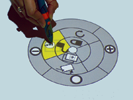
 Attribute gates are a new user interface element designed to address the problem of concurrently setting attributes and moving objects between territories on a digital tabletop. Motivated by the notion of task levels in activity theory, and crossing interfaces, attribute gates allow users to operationalize multiple subtasks in one smooth movement. We present two configurations of attribute gates; (1) grid gates which spatially distribute attribute values in a regular grid, and require users to draw trajectories through the attributes; (2) polar gates which distribute attribute values on segments of concentric rings, and require users to align segments when setting attribute combinations. The layout of both configurations was optimised based on targeting and steering laws derived from Fitts' Law. A study compared the use of attribute gates with traditional contextual menus. Users of attribute gates demonstrated both increased performance and higher mutual awareness.
 9'26", 95Mb

 9'52", 85Mb

 4'46", 38Mb
  5'05", 27Mb

 9'26", 95Mb







The development of user interface systems has languished with the stability of desktop computing. Future systems, however, that are off-the-desktop, nomadic or physical in nature will involve new devices and new software systems for creating interactive applications. Simple usability testing is not adequate for evaluating complex systems. The problems with evaluating systems work are explored and a set of criteria for evaluating new UI systems work is presented.

 6'44", 63Mb

 2'30", 32Mb

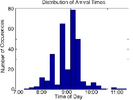

In this paper we introduce tag expression, a novel form of preference elicitation that combines elements from tagging and rating systems. Tag expression enables users to apply affect to tags to indicate whether the tag describes a reason they like, dislike, or are neutral about a particular item. We present a user interface for applying affect to tags, as well as a technique for visualizing the overall community's affect. By analyzing 27,773 tag expressions from 553 users entered in a 3-month period, we empirically evaluate our design choices. We also present results of a survey of 97 users that explores users' motivations in tagging and measures user satisfaction with tag expression.
 3'08", 66Mb
  4'03", 40Mb
 Cellular phones are widely used to access the WWW. However, most available Web pages are designed for desktop PCs. Cellular phones only have small screens and poor interfaces, and thus, it is inconvenient to browse such large sized pages. In addition, cellular phone users browse Web pages in various situations, so that appropriate presentation styles for Web pages depend on users' situations. In this paper, we propose a novel Web browsing system for cellular phones that allocates various functions for Web browsing on each numerical key of a cellular phone. Users can browse Web pages comfortably, selecting appropriate functions according to their situations by pushing a single button.
 5'35", 71Mb
  2'31", 6Mb
  3'48", 16Mb
 3'54", 182Mb