Keywords



 1'24", 27Mb
 4'20", 50Mb
  4'52", 43Mb
  2'30", 33Mb

Cameras are a useful source of input for many interactive applications, but computer vision programming is difficult and requires specialized knowledge that is out of reach for many HCI practitioners. In an effort to learn what makes a useful computer vision design tool, we created Eyepatch, a tool for designing camera-based interactions, and evaluated the Eyepatch prototype through deployment to students in an HCI course. This paper describes the lessons we learned about making computer vision more accessible, while retaining enough power and flexibility to be useful in a wide variety of interaction scenarios.
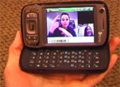
We describe our system called MobileASL for real-time video communication on the current U.S. mobile phone network. The goal of MobileASL is to enable Deaf people to communicate with Sign Language over mobile phones by compressing and transmitting sign language video in real-time on an off-the-shelf mobile phone, which has a weak processor, uses limited bandwidth, and has little battery capacity. We develop several H.264-compliant algorithms to save system resources while maintaining ASL intelligibility by focusing on the important segments of the video. We employ a dynamic skin-based region-of-interest (ROI) that encodes the skin at higher quality at the expense of the rest of the video. We also automatically recognize periods of signing versus not signing and raise and lower the frame rate accordingly, a technique we call variable frame rate (VFR).
We show that our variable frame rate technique results in a 47% gain in battery life on the phone, corresponding to an extra 68 minutes of talk time. We also evaluate our system in a user study. Participants fluent in ASL engage in unconstrained conversations over mobile phones in a laboratory setting. We find that the ROI increases intelligibility and decreases guessing. VFR increases the need for signs to be repeated and the number of conversational breakdowns, but does not affect the users' perception of adopting the technology. These results show that our sign language sensitive algorithms can save considerable resources without sacrificing intelligibility.
 4'15", 47Mb
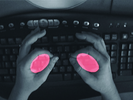
 We present Bonfire, a self-contained mobile computing system that uses two laptop-mounted laser micro-projectors to project an interactive display space to either side of a laptop keyboard. Coupled with each micro-projector is a camera to enable hand gesture tracking, object recognition, and information transfer within the projected space. Thus, Bonfire is neither a pure laptop system nor a pure tabletop system, but an integration of the two into one new nomadic computing platform. This integration (1) enables observing the periphery and responding appropriately, e.g., to the casual placement of objects within its field of view, (2) enables integration between physical and digital objects via computer vision, (3) provides a horizontal surface in tandem with the usual vertical laptop display, allowing direct pointing and gestures, and (4) enlarges the input/output space to enrich existing applications. We describe Bonfire's architecture, and offer scenarios that highlight Bonfire's advantages. We also include lessons learned and insights for further development and use.
 4'09", 48Mb
 Although interactive surfaces have many unique and compelling qualities, the interactions they support are by their very nature bound to the display surface. In this paper we present a technique for users to seamlessly switch between interacting on the tabletop surface to above it. Our aim is to leverage the space above the surface in combination with the regular tabletop display to allow more intuitive manipulation of digital content in three-dimensions. Our goal is to design a technique that closely resembles the ways we manipulate physical objects in the real-world; conceptually, allowing virtual objects to be 'picked up' off the tabletop surface in order to manipulate their three dimensional position or orientation. We chart the evolution of this technique, implemented on two rear projection-vision tabletops. Both use special projection screen materials to allow sensing at significant depths beyond the display. Existing and new computer vision techniques are used to sense hand gestures and postures above the tabletop, which can be used alongside more familiar multi-touch interactions. Interacting above the surface in this way opens up many interesting challenges. In particular it breaks the direct interaction metaphor that most tabletops afford. We present a novel shadow-based technique to help alleviate this issue. We discuss the strengths and limitations of our technique based on our own observations and initial user feedback, and provide various insights from comparing, and contrasting, our tabletop implementations

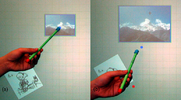
Screen-less wearable devices allow for the smallest form factor and thus the maximum mobility. However, current screen-less devices only support buttons and gestures. Pointing is not supported because users have nothing to point at. However, we challenge the notion that spatial interaction requires a screen and propose a method for bringing spatial interaction to screen-less devices.
We present Imaginary Interfaces, screen-less devices that allow users to perform spatial interaction with empty hands and without visual feedback. Unlike projection-based solutions, such as Sixth Sense, all visual "feedback" takes place in the user's imagination. Users define the origin of an imaginary space by forming an L-shaped coordinate cross with their non-dominant hand. Users then point and draw with their dominant hand in the resulting space.
With three user studies we investigate the question: To what extent can users interact spatially with a user interface that exists only in their imagination? Participants created simple drawings, annotated existing drawings, and pointed at locations described in imaginary space. Our findings suggest that users' visual short-term memory can, in part, replace the feedback conventionally displayed on a screen.
 3'03", 16Mb
An effective user interface is a cooperative interaction between humans and their technology. For that interaction to work, it needs to recognize the limitations and exploit the strengths of both parties. In this talk, I will concentrate on the human side of the equation. What do we know about human visual perceptual abilities that might have an impact on the design of user interfaces? The world presents us with more information than we can process. Just try to read this abstract and the next piece of prose at the same time. We cope with this problem by using attentional mechanisms to select a subset of the input for further processing. An inter-face might be designed to .capture. attention, in order to induce a human to interact with it. Once the human is using an interface, that interface should .guide. the user.s atten-tion in an intelligent manner. In recent decades, many of the rules of attentional capture and guidance have been worked out in the laboratory. I will illustrate some of the basic principles. For example: Do some colors grab attention better than others? Are faces special? When and why do people fail to .see. things that are right in front of their eyes.

Most of today's GUIs are designed for the typical, able-bodied user; atypical users are, for the most part, left to adapt as best they can, perhaps using specialized assistive technologies as an aid. In this paper, we present an alternative approach: SUPPLE++ automatically generates interfaces which are tailored to an individual's motor capabilities and can be easily adjusted to accommodate varying vision capabilities. SUPPLE++ models users. motor capabilities based on a onetime motor performance test and uses this model in an optimization process, generating a personalized interface. A preliminary study indicates that while there is still room for improvement, SUPPLE++ allowed one user to complete tasks that she could not perform using a standard interface, while for the remaining users it resulted in an average time savings of 20%, ranging from an slowdown of 3% to a speedup of 43%.
 3'18", 16Mb