Keywords





 4'30", 29Mb
  4'19", 21Mb
  4'40", 43Mb
  3'48", 31Mb
Creating multiple prototypes facilitates comparative reasoning, grounds team discussion, and enables situated exploration. However, current interface design tools focus on creating single artifacts. This paper introduces the Juxtapose code editor and runtime environment for designing multiple alternatives of both application logic and interface parameters. For rapidly comparing code alternatives, Juxtapose introduces selectively parallel source editing and execution. To explore parameter variations, Juxtapose automatically creates control interfaces for "tuning" application variables at runtime. This paper describes techniques to support design exploration for desktop, mobile, and physical interfaces, and situates this work in a larger design space of tools for explorative programming. A summative study of Juxtapose with 18 participants demonstrated that parallel editing and execution are accessible to interaction designers and that designers can leverage these techniques to survey more options, faster.

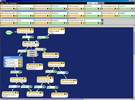
When designing context-aware applications, it is difficult to for designers in the studio or lab to envision the contextual conditions that will be encountered at runtime. Designers need a tool that can create/re-create naturalistic contextual states and transitions, so that they can evaluate an application under expected contexts. We have designed and developed RePlay: a system for capturing and playing back sensor traces representing scenarios of use. RePlay contributes to research on ubicomp design tools by embodying a structured approach to the capture and playback of contextual data. In particular, RePlay supports: capturing naturalistic data through Capture Probes, encapsulating scenarios of use through Episodes, and supporting exploratory manipulation of scenarios through Transforms. Our experiences using RePlay in internal design projects illustrate its potential benefits for ubicomp design.

Multi-device user interface design mostly implies creating suitable interface for each targeted device, using a diverse set of design tools and toolkits. This is a time consuming activity, concerning a lot of repetitive design actions without support for reusing this effort in later designs. In this paper, we propose D-Macs: a design tool that allows designers to record their design actions across devices, to share these actions with other designers and to replay their own design actions and those of others. D-Macs lowers the burden in multi-device user interface design and can reduce the necessity for manually repeating design actions.
 4'55", 75Mb
 2'20", 8Mb
  3'19", 941Kb
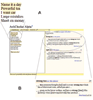
 Collocation preferences represent the commonly used expressions, idioms, and word pairings of a language. Because collocation preferences arise from consensus usage, rather than a set of well-defined rules, they must be learned on a case-by-case basis, making them particularly challenging for non-native speakers of a language. To assist non-native speakers with these parts of a language, we developed AwkChecker, the first end-user tool geared toward helping non-native speakers detect and correct collocation errors in their writing. As a user writes, AwkChecker automatically flags collocation errors and suggests replacement expressions that correspond more closely to consensus usage. These suggestions include example usage to help users choose the best candidate. We describe AwkChecker's interface, its novel methods for detecting collocation errors and suggesting alternatives, and an early study of its use by non-native English speakers at our institution. Collectively, these contributions advance the state of the art in writing aids for non-native speakers.


 1'46", 5Mb